2D Instruction Challenge
I am attempting to add Text Tokens to both Elevation and Section, as well as adding "DRAWRECTANGLE" to Elevation, showing the outline for the "Rollouts".
I have taken a Master Vertical Designer 1 Bay, used "Inner Drawers" and changed the drawer type to "Wood Rollout Three Sided Shelf". I have deleted the current elevation text that reads "4 Drawers" and renamed the cross section text to "Rollouts".
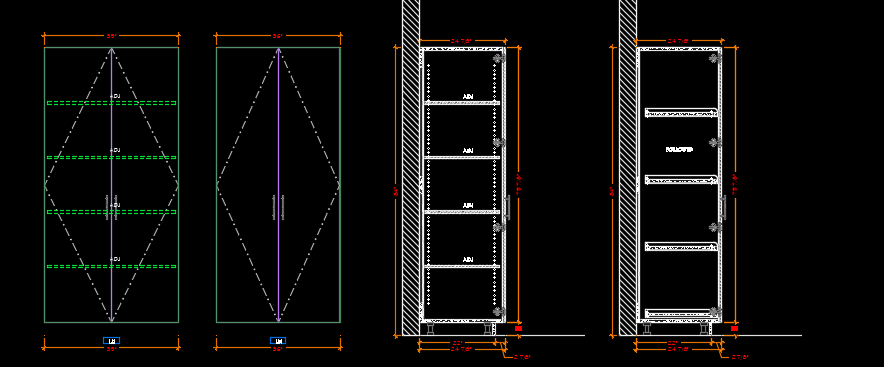
I though maybe for the elevation "DRAWRECTANGLE" use the formula for the shelf "DRAWRECTANGLE". and change parts of the formula to read "Inner Drawers". I don't think it will work!!
ANY DIRECTION TO ACCOMPLISH MY GOAL, IS APPRECIATED!
Here are the formulas for the Shelf "DRAWRECTANGLE"
=IF(IF(Shelf_Qty="Lookup",Max_Shelf_Qty,Shelf_Qty)>0,"DRAWRECTANGLE",0) > Changes for quantity
PAREMETER 1
=IF(Return_2D_Elv=1,IF(IFERROR(IF(Subassembly_Title="N",INDIRECT(PARENTNAME("Subassembly_Z_Rotation")),Subassembly_Z_Rotation),Subassembly_Z_Rotation)=-90,ABS(Subassembly_Y_Origin+IFERROR(IF(Subassembly_Title="N",INDIRECT(PARENTNAME("Subassembly_Y_Origin")),0),0))+Depth+IF(Subassembly_Title="N",Subassembly_X_Origin,0)+Elevation_Return_Offset,IF(IFERROR(IF(Subassembly_Title="N",INDIRECT(PARENTNAME("Subassembly_Z_Rotation")),Subassembly_Z_Rotation),Subassembly_Z_Rotation)=90,-ABS(Subassembly_Y_Origin+IFERROR(IF(Subassembly_Title="N",INDIRECT(PARENTNAME("Subassembly_Y_Origin")),0),0))-Depth+IF(Subassembly_Title="N",Subassembly_X_Origin,0)-Elevation_Return_Offset,0)),0)+(Shelf_Clip_Gap/2)