Control colors of drawer boxes and other subassemblies outside of drawing tokens
Hi all,
My company likes to have shop drawings differentiate between cases and subassemblies with different colors. Think items that go in after a case is assembled like adjustable shelves, drawers, kick faces, etc. Blue is for the casework and green is for the subassemblies, as seen in the attached screen shot below.
I've been able to utilize Drawing Tokens and assign some parts to a specific colored layer for this purpose, however, it is not something I have been able to customize for drawer boxes. It's quite the time consuming task to add several DRAWRECTANGLE or DRAWPOLYLINE tokens for all the drawer components, drawer types, and have them all flawlessly adjust with any changes to size and placement, and it feels outside the scope of my abilities to do so successfully. For the time being it's something we manually change at the end of drafting an item before publishing a PDF.
It would be nice to have the ability to set up different colors for different subassemblies. Perhaps in the Shop Drawings section of the Global, for instance. Or to split up the catch-all 2D_SECTION layer that all parts fall under when creating sections. Having greater customizability in this regard would be fantastic as the current system of creating drawing tokens feels like somewhat of a work around to what could be a drafting feature of Microvellum.
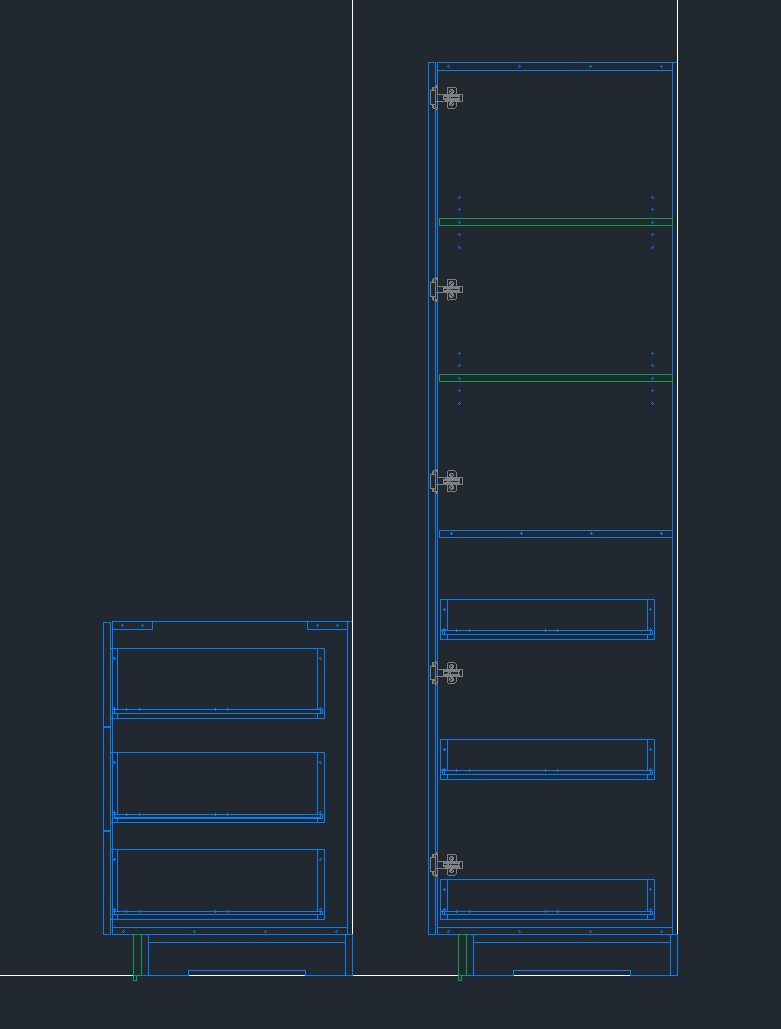 Green Drawing Tokens