BSB MULTIPLE FEATURE REQUEST - Bring Back Autocad command / functionality
MEASUREGEOM - I made my own MEASUREGEOM command using lisp since Bricscad is missing what i would have thought would have been a very standard basic command, but today it showed me the wrong angle and now I'm worried that it has been misfiring somewhere and i have been trusting it since inception. Who knows how many things I've done wrong since then!
All i want is to be able to click a button in the ribbon for radius and for angle. See attached video
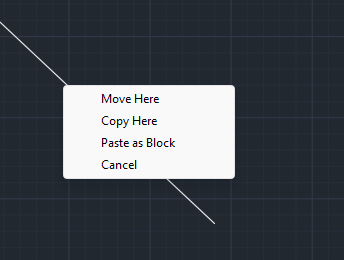
Right Click and Hold, Drag and Drop - we used to be able to right click and hold a drawing / part in Autocad, drag it wherever we wanted and when we let go there would be a context menu (see below). We use this all the time to quickly move parts and to drop items as blocks. It was so quick and easy. In Bricscad i can move it around if i click and hold with left and hold shift but i get no context window. I've resorted to cutting and shift + ctrl v pasting for blocks but I miss the simplicity of the right click drag and drop it was just so easy
Windows opening in a free for all - To be honest, I haven't looked too much into finding a solution for this but it bugs me. For example, when we press the Nest Editing and 2D machining Tools button or open up a part in 2D, the window doesn't just open in the right pane like Autocad used to do. half the time it opens up on my second screen and every time i have to drag and drop it to lock it in but it never saves the position (See Video 2)
Ps, not a feature request but i do miss the view cube from Autocad