Custom Product Help
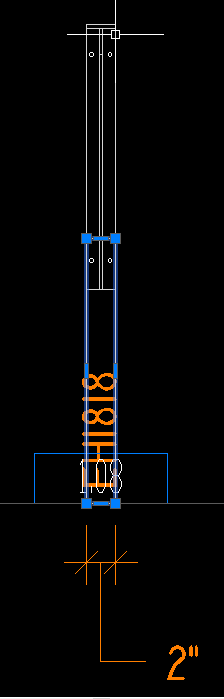
I am adding the Rakks EH brackets to our library. I did so by creating a new empty part and adding parts until I had the shapes needed to represent the brackets. I added prompts so that I could use the same part for different sized brackets. Then I added a label (drawtext token) to call out the bracket in the elevation view. All works like it should except for 2 things:
1. I cannot find where the highlighted (selected rectangle) box is coming from in the elevation drawing below. There does not seem to be an associated drawing token for this. Same with the dimension, but I assume they are coming from the same spot? Where can I look?
2. Is there any way to have the text update based on the bracket size? Currently it is static text but it would be nice if it was dynamic based on size i.e. RAKKS EH[HEIGHT] [DEPTH]. Any ideas on how I might be able to accomplish this?
Thank you.