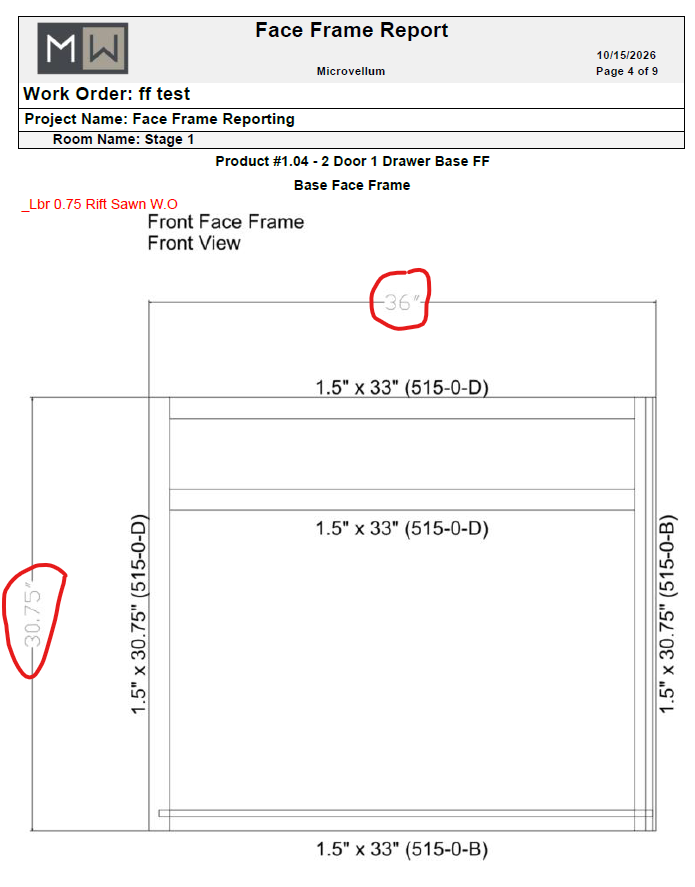
Face Frame Report Dimension Text Too Light to Read
Since we switched to Bricscad, our shop has been struggling to read the dimensions on our face frame reports. I looked back at the ones from OEM and the text was light in those, but was dark enough. Now it's too light to easily read and they are having to zoom in on a lot of these dimensions to be able to see them.
I thought it would be easy to go in to the face frame drawing tokens and change some things, but nothing I'm changing in there seems to affect the reports. Does anyone know how the face frame images are produced for the reports and where I can go to change the dimension text?
This is in the component library as we have not yet transitioned to foundations, but I attempted it in FL and it seems to be the same result.