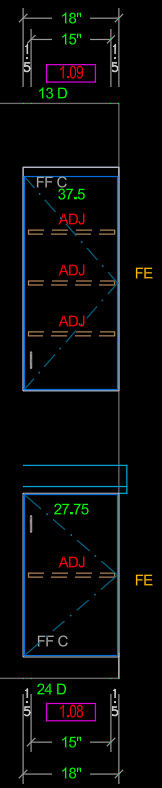
Feature Requests: Adjustments for 2D Drafting
We have been working towards being able to use the
Foundation Library and there have been some basic drafting things that we have
run across that we feel could be improved or updated to function
better.
Plan View:
It would be nice if there was a clear way (check box) to turn on/off the depth dimension at finished ends.
In the global drop down there could even be a “none” option to turn this off.
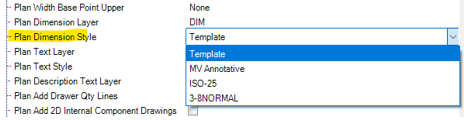
There are many times where we would have a run of cabinets where cabinets a spaced out under the top and would have multiple finished ends. We don’t think we should need to turn these off manually every time.
This would require telling the local cabinet and well as possibly the 2D Instructions subassembly to look to this global
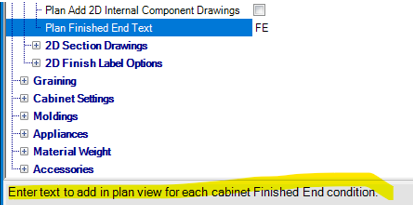
It would be nice if there was a clear way (check box) to turn on/off the “FE” text at finished ends.
I am guessing we could simply take the “FE” out of this and it would then be blank, but it would be nice to either have a check box to clearly turn it on/off or more information in the description to explain that this is how to turn it off.
If the checkbox were used I believe it would require telling the local cabinet and well as possibly the 2D Instructions subassembly to look to this global
Elevation View:
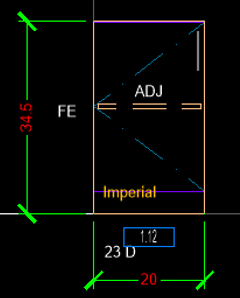
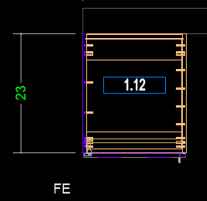
It would be nice if there was a clear way (check box) to turn on/off the cabinet height dimension at finished ends.
In the global for the elevations there is a check box, but it currently doesn’t appear to be linked to anything.
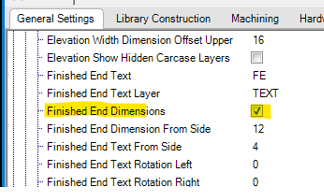
The 2D Instructions subassembly to looks to the cabinet level but the cabinet level is simply looking to if there is a Finished end.
There are many times were we would have a run of cabinets where cabinets a spaced out under the top and would have multiple finished ends. We don’t think we should need to turn these off manually every time.
This would require telling the local cabinet and well as possibly the 2D Instructions subassembly to look to this global
Color Label for Base / Tall
For the base and tall cabinets the color label doesn’t appear to be placed at the same location as the formula tells us it should be placed.
The value called for 5.75 but its more like 2.75-3”.

Color Label for Uppers
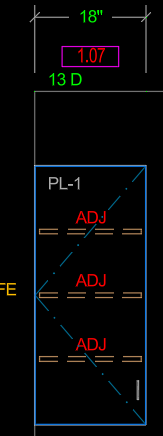
Something that we did to clean up our old compt library was to move the color label to the upper left corner instead of the bottom left.
We found that single door cabinets with right swing would then end up with hardware in the same overlapping location.
We then moved the cabinet depth just above the cabinet.
We made a variable to be able to bump the depth, cabinet number, dimensions, above the height of the wall to allow for a cleaner look on residential projects where people are not used to looking at these types of details all the time.
Face Frame Cabinets
In our old compt library we made many of the same updates that we noted above to try and clean up the look and implementation of all the dimensions and text.
The current “stock” version has quite a bit of overlap and the text seems to offset in odd and not anticipated ways.
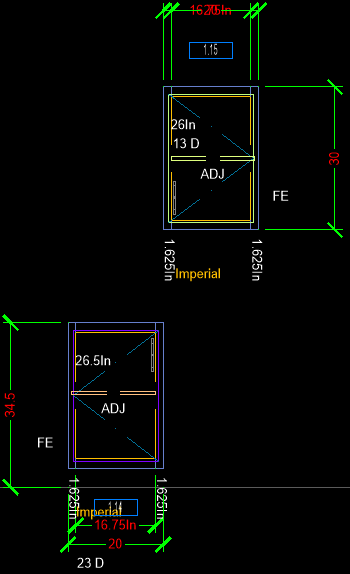
I am guessing with some work we could get them to look closer to what we have built in the old compt library.