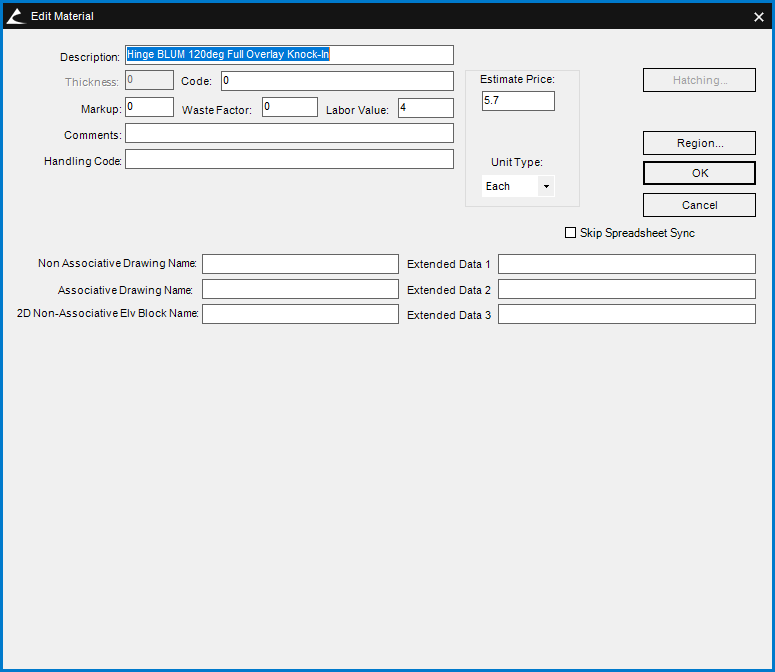
Hardware 3D DWG not appearing
Hey ya'll,
I'm trying to add a 3D dwg to hinge, but for some reason it's not showing up. The machining shows up, but the DWG is no where to be found. I'm thinking it's some kind of spreadsheet issue, but if anyone has any ideas I'd greatly appreciate it.
I'm trying to get the 3D dwg for this hinge to appear. I've added a DWG matching the exact hardware name in the Graphics\Hardware folder as "Hinge BLUM 120deg Full Overlay Knock-In.dwg". I also tried adding another dwg as "3D_Hinge BLUM 120deg Full Overlay Knock-In.dwg" and input this file name in the Non-Associative and Associative Drawing Name fields. I also tried copying and renaming a DWG for another hardware item that I know works, just to be sure it's not an issue with the DWG file itself. Still nothing.
I've added 3D DWG for other hardware with no issues, but this one is just not working. Any ideas?