Microvellum Community

How to Edit 'Fill wall with products' dialog box

When you place a product using 'fill wall with products' this dialog box appears:
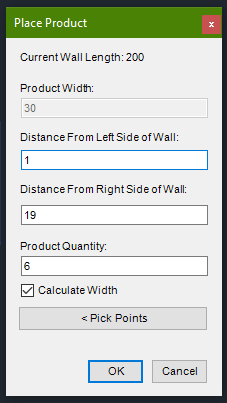

I'm wondering if there is any way to edit the calculations that give the defaults for these prompts. For example I would like Product Quantity to come in as '1' for default not '6' like it is. Is this something I can find in the globals or project Wizard? Any help is appreciated.

Thanks,
Josh

    Toolbox BSB Survey


    Have you been using Toolbox BSB? We'd love to hear what you think!

    Take the Survey

      MVU eLearning


      Grow Your Knowledge
      Follow along with RJ as he takes you on a journey to build your foundational knowledge of Toolbox.


        Follow us on:


          ERP for Millwork Shops


          Discover how Microvellum and INNERGY streamline operations for cabinet shops and millwork manufacturers.