Machine Token simulator
Here is a link to my machine token simulator.
https://docs.google.com/spreadsheets/d/1SjA5ULHhiZK8wV8Tp16h0HRY8lLbvMEy2eIyPE6gT9w/template/preview
I think you should be able to click USE TEMPLATE or save a copy, when signed into Google, then a copy will be saved to your Drive.
- Select a machine token, and corresponding FACE/EDGE/CORNER
- Select MACHINE POINT
- Enter values in the GREEN cells
- The visualiser will show
- X and Y directions for machining
- Machine edge locations
- Face 5 or 6
Some of the tokens have a usable ASSISTANT table. The PLINE one for example will create a vector point formula that can be copied and pasted directly into the MV spreadsheet.
You can create up to 10 custom prompts on the CUSTOMPROMPTS sheet.
Panel_Length and Panel_Width are built in.
An example:
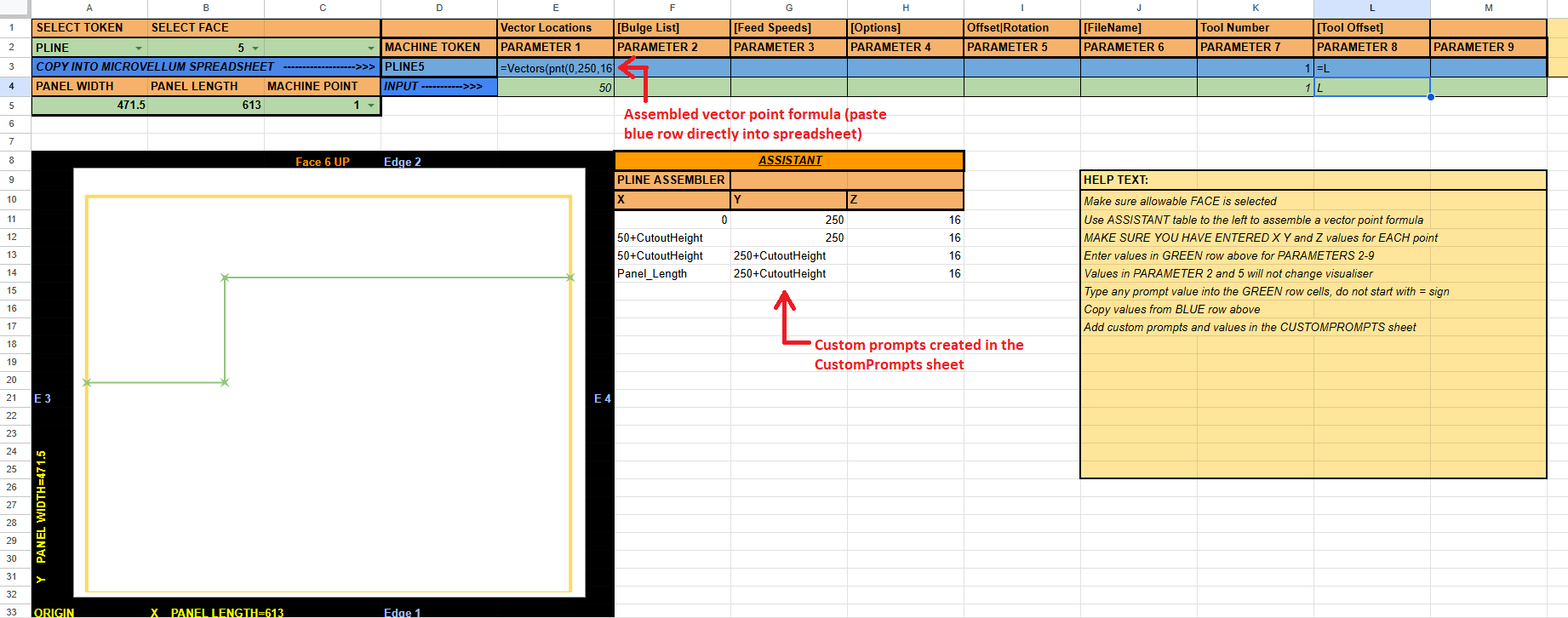
I find it useful to be able to visualise the machine origin and how a token will apply to the panel given the machine point.
I've got 8 machine tokens in there at the moment. There are a few more i will eventually add.
Cheers,