Modfying nests and toolpath generation
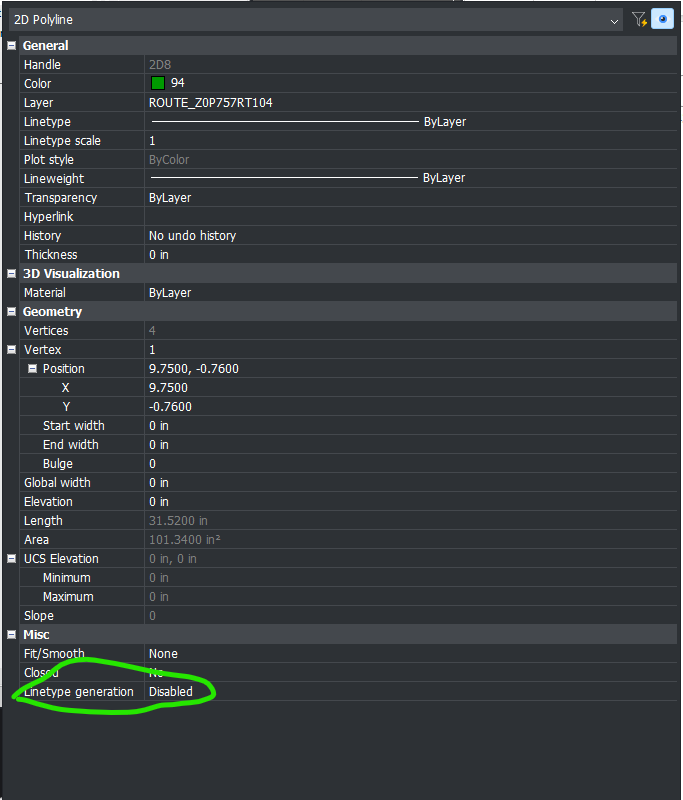
It might just be me, but when I was adding some cutouts in a part today and also later when changing set mill location of parts in a nest, I encountered a problem. First, i pasted the geometry of the cut through into the 2D part editor and after selecting the tool, depth, compensation, etc. and then tried to apply that tool to the polyline only to have the polyline disappear and no toolpath created. After attempting various different tool settings with the same result, i finally happened to look at the properties of the polyline and noticed a 'miscellaneous' property for Linetype Generation which was set at disabled. I toggled it to enabled and Voila!, toolpath no problem.
Secondly i was re-optimizing some nests and changed setmill location on a part and POOF! toolpath polyline gone and undo was unable to bring the geometry back so i was forced to close with no save and go back through all of the re-optimization again. this time through I selected all of the parts' geometry and changed the Linetype Generation to enabled and was able to change the setmill locations with no problem.
A ticket was already opened to alert MV to this behavior, but i thought it would maybe help someone else out if they happen on this post. Good luck!