Network Performance Issues
After posting a question in the focus group webinar that just occurred, I got to thinking about the response from the Microvellum team. My original question was asking whether Microvellum had any plans for local caching of data to help speed up certain menus/facilitate remote work, because in my sort of naive view this would solve some of the pain points that occur with how my company uses the product.
So instead, I will explain 3 areas where network performance seems to be causing issues for me and hopefully foster some discussion or tips from the community as to how to address them, or what feature requests might be worth asking about from the Microvellum team that could address these areas.
We have 1 remote worker who uses Parsec currently to connect into an office computer to work. It would obviously be nicer to be able to work on his local machine as he is over an hour away in a rural area without the best internet connection to our office, so the remote desktop connection can sometimes be laggy. I too would like to be able to work from home occasionally without needing to remote into my office desktop. It would be great if there were some better ways to deal with rooms/projects remotely, both in the case of remote employees or working with other service providers to outsource Microvellum drawings. A lot of this gets talked about here: https://community.microvellum.com/portal/en/community/topic/post-covid-remote-workforce which I feel sheds some more light on the clunkiness of the current way this is handled.
A second issue (albeit minor) is just the program refreshing when no changes are made, if you pull up a product prompt and click okay after having made zero changes, it ends up triggering a call to pull info from the spec group and redraw the product. It's a minor annoyance but I feel like some sort of local state management gets rid of this. In the same vein, simply clicking toolbox setup -> options and then making zero changes to options and clicking OK ends up pulling down 150 MB of data for no apparent reason.
Last issue has to do with work order processing out at our CNCs which are on the opposite side of our warehouse. I will admit that we are probably at the limits of the length of CAT5 we are using for that run, but pulling up the "Display Patterns" in order to print labels out at the machine is frustratingly slow.
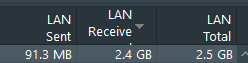
A single small work order ends up downloading close to 3 GB from the SQL server just to display a few rudimentary nest diagrams and lists of labels. It is slow on my gigabit connection in the office, and at the limits of a cat5 connection on the other end of the warehouse it can take 3-4 minutes for that screen to come up.
This ended up a lot longer than probably necessary, I also realize that some of the solutions to this are simply to upgrade network infrastructure in my shop. Or perhaps as Innergy Design becomes closer to feature parity with Microvellum, that becomes a more enticing option for remote work/project outsourcing. Interested to hear if these issues resonate with anyone else.