Yield Calculation Options for the New True Shape Nesting Optimizer
We’re making good progress on our new true shape optimizer, and I’ll have more to share soon about what we’ve been working on and when you might be able to access the beta. Today, a question came up that we ran by our internal team for feedback, and we thought it’d be great to also get the Community’s thoughts on how we calculate sheet yield in the new optimizer.
Currently, the legacy block nesting (rectangular parts), legacy true shape, and beta block nest optimizers use what I will refer to as “Method 1”, and the beta true shape optimizer uses what I will refer to as “Method 2”.
Yield Definition:
Yield is the percentage of a sheet's area that is occupied by placed parts. To calculate it, we total the area of all parts and compare that to the sheet's total area. Both Method 1 and Method 2 follow approach. The difference between them is how the area of parts is calculated. Method 1 does not consider routes within a part, while method 2 does.
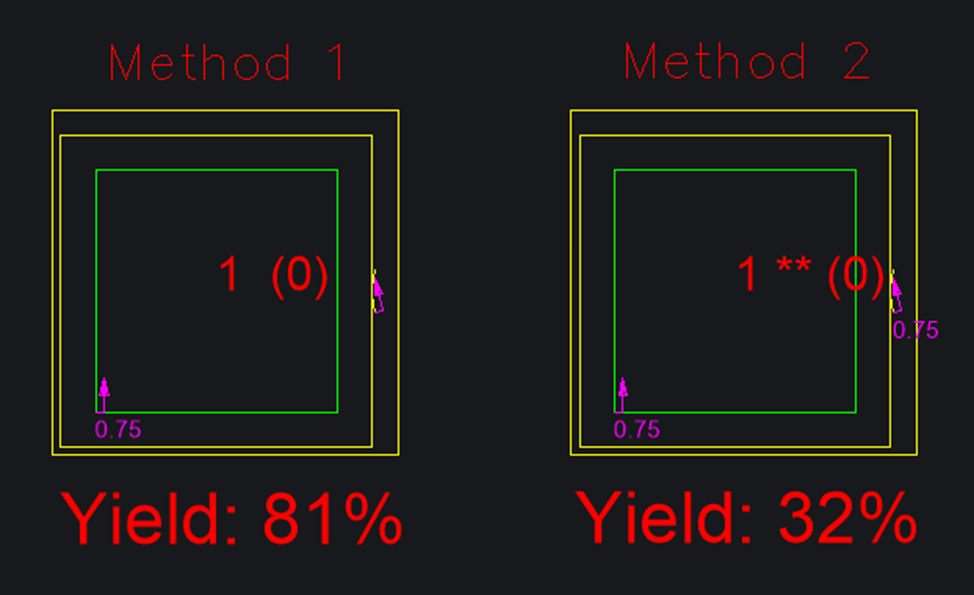
Method 1: (Everything within the part border is considered used.)
The legacy block, legacy true shape, and beta block nest optimizers currently calculate yield by considering anything within the part’s border as the part’s area.
Example 1:
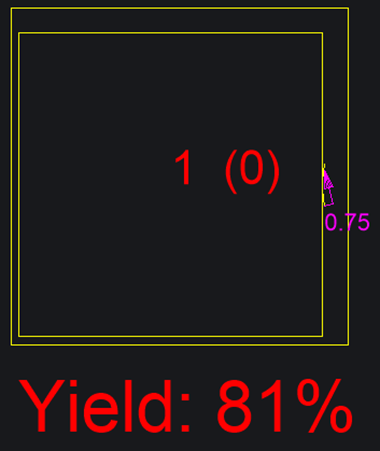
If we start with a 10×10 sheet and place a 9×9 square part on it, the yield will be 81%.
- Area of sheet: 10x10 = 100
- Area of part: 9x9 = 81
- 81 is 81% of 100, so the yield is 81%
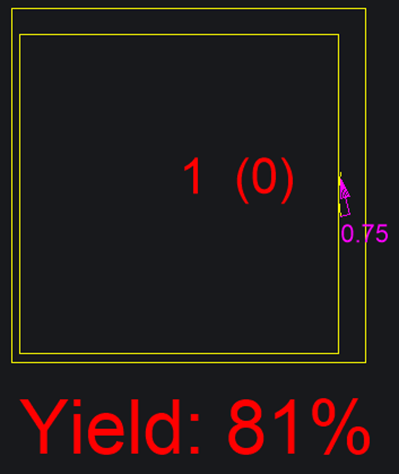
Example 2:
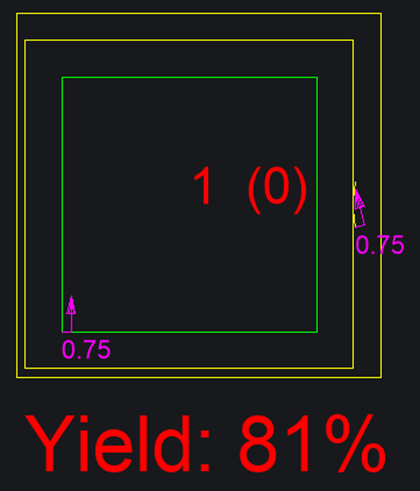
If we start with a 10×10 sheet and place a 9×9 square part on it, then cut a 7×7 route through the part, the yield will still be 81%. The calculation is identical to the first example because Method 1 ignores routes.
- Area of sheet: 10x10 = 100
- Area of part: 9x9 = 81
- 81 is 81% of 100, so the yield is 81%
Example 3: (This example is only applicable to the beta trueshape nest)
If we start with a 10×10 sheet and place a 9×9 square part on it, then cut a 7×7 route through the part and place a 5×5 part within that space, the yield will be 106%. Because this calculation ignores the space removed by the route, the result exceeds 100%.
- Area of sheet: 10x10 = 100
- Area of part 1: 9x9 = 81
- Area of part 2: 5x5 = 25
- Total area of parts: 81 + 25 = 106
- 106 is 106% of 100, so the yield is 106%
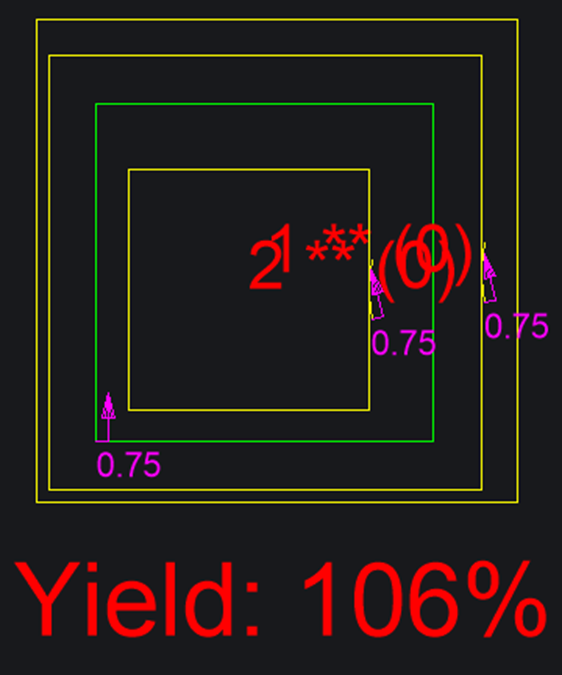
Method 2: (Only areas of the sheet that make up a final part will be considered used)
The beta true shape nest optimizer calculates yield by first getting the area of the part border and then subtracting the area of each closed route within it that cuts fully through the sheet. This is necessary because the new optimizer allows parts to be placed within the routed cutouts (as long as the cutout is fully through the sheet)
Example 1:
If we start with a 10×10 sheet and place a 9×9 square part on it, the yield will be 81%. With no routes involved, this calculation is identical to Example 1 in Method 1.
- Area of sheet: 10x10 = 100
- Area of part: 9x9 = 81
- 81 is 81% of 100, so the yield is 81%
Example 2:
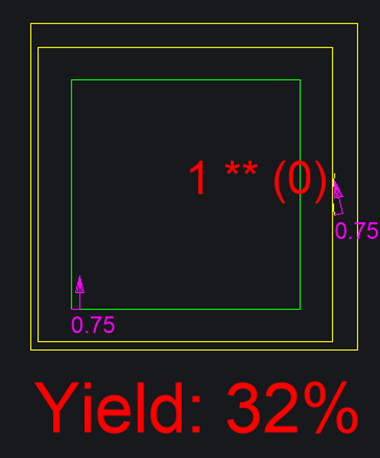
If we start with a 10×10 sheet and place a 9×9 square part on it, then cut a 7×7 route through that part, the yield will be 32%. This is calculated by determining the area of the part’s border and subtracting the area removed by the route.
- Area of sheet: 10x10 = 100
- Area of part Border: 9x9 = 81
- Area of Route in Part: 7x7 = 49
- Area of Part: 81 - 49 = 32
- 32 is 32% of 100, so the yield is 32%
Example 3: (This example is only applicable to the beta trueshape nest)
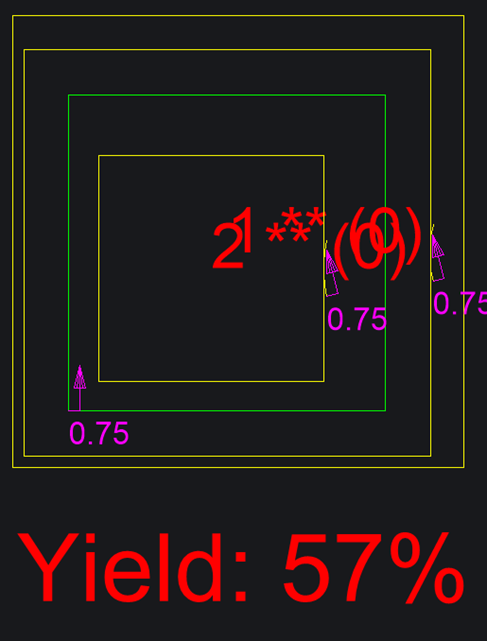
If we start with a 10×10 sheet and place a 9×9 square part on it, then cut a 7×7 routed opening in that part, and fit a 5×5 part inside the opening, the yield will be 57%. This yield calculation accounts for the material removed by the route.
- Area of sheet: 10x10 = 100
- Area of part 1 Border: 9x9 = 81
- Area of route in part 1: 7x7 = 49
- Total Area of part 1: 81 - 49 = 32
- Area of part 2: 5x5 = 25
- Total area of parts: 32 + 25 = 57
- 57 is 57% of 100, so the yield is 57%
Summary of Methods
- Method 1:
- Considers the entire part border as “used area,” ignoring any routed-out space.
- Can overestimate yield, especially if routes cut out large interior spaces.
- Can produce yields greater than 100% if nested parts are placed within routed areas.
- Method 2:
- Subtracts routed-out areas when calculating the yield.
- More accurately reflects material utilization.
- Prevents yields from exceeding 100%, giving users a more realistic measure of efficiency.
How should we calculate and display the yield for sheets?
Option A:
All nests should use Method 1, meaning the legacy block, legacy true shape, beta block, and beta true shape optimizers will all follow this method.
- Pros: All yields will be consistent, making it easy to accurately compare results across all nests.
- Cons: The beta true shape optimizer may produce results greater than 100%, which could confuse users.
Option B:
Only the beta true shape nest optimizer should use Method 2. The legacy block, legacy true shape, and beta block optimizers should continue to use Method 1.
- Pros: The yield calculated by the beta true shape optimizer will be more accurate, as it will not produce values greater than 100%.
- Cons: Yields will be inconsistent between the beta true shape nest and other nest results, which could make it more difficult to compare yields across nests.
.....
Let us know what option you'd choose...