workbook designer keeps reverting
i recently added 2 new drawer slides as well as two new drawer types in the workbook (G) we are using the imperial library for what its worth, everything was fine until I microvellum was updated now i have tried to copy an old workbook *(G) so that i would have the slides in it, but i noticed the bottom drawer (bottom and back) were not coming in i found that the look up table for the drawer bay was not matching the range anymore, so i redefined it and everything worked. very nice.
however, whenever i try to start a new project it keeps going back to the original range. ok, so i will delete 3 of the "titles" in the drawer slide look up tables, so that it will match up, well when i did that it moved the range up 3 so that it still would not match, i have deleted the "name" lookuptablebaydrawerposition and redefined the range, tried matching it back up to where it was originally etc nothing will stay, where i have saved the "project" workbooks it seems to work, but i tried saving it in the "library" workbook and it just keeps reverting the range, anything i can do?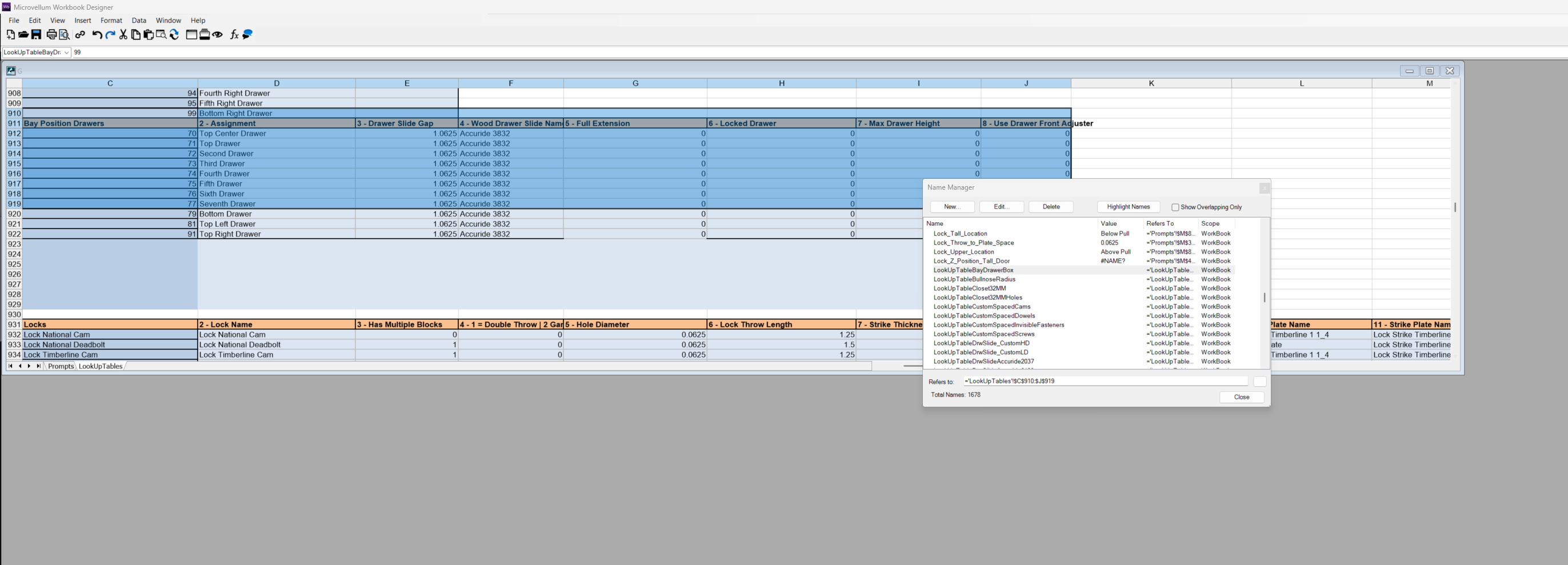
Topic Participants
Thomas
INNERGY Industry Benchmarking Tool
MVU eLearning
Grow Your Knowledge
Follow along with RJ as he takes you on a journey to build your foundational knowledge of Toolbox.
Follow us on: